Peripheral Power: How To Use Your Scanner To Enlarge Images
This is one of those posts where you have to admit to being a dope so you can pass along a tip that might help others.
Gotta grit my teeth… OK, here goes!
Many years ago I spent considerable time and effort thinking up humorous greeting card designs and submitting them to American Greetings and other card companies.
At some point I thought: instead of submitting just one idea per page, I could save postage by squeezing three designs onto a page.
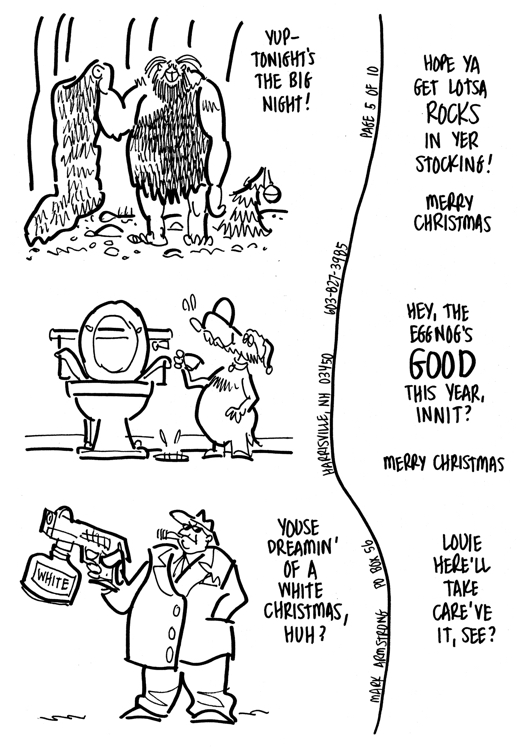
So that’s what I did. I put the front of each card on the left, and the inside greeting on the right. I used plain white copy paper, 8.5″ x 11″, so each B&W sketch was about 3″ high.
Here’s what a typical page looked like:
I didn’t have much luck, but I saved all the sketches hoping I might be able to use them someday.
Fast forward to the present, where every artist and his sister seems to have an online store, myself included.
Every so often I’d come across my old card ideas and think: These are great!! (I’m a big fan of my own work.)
Then I’d think: I should scan these in and color ’em and upload them to my online store where they’ll all be big sellers!! (My electrician tells me to think positive.)
Then I’d smack my forehead and think: Ya dope! Why’d ya draw ’em so small?? They’re only 3″ high, and the average greeting card is 5″ x 7″.
Now you might be thinking: Couldn’t you scan them in
and then use an image-editing program like Photoshop or Pixelmator to enlarge them? Yes, I could– but doing so would thicken all the lines and give the drawings a very dense look.
So the forehead-smacking went on for years, until one night, several weeks ago, I’m lying in bed and I thought: what if I scanned them in at a much higher resolution?– say 600 or 1200 dpi, instead of the usual 300 dpi?– would that possibly enlarge them at the same time?
So next morning I’m anxious to give it a try. Before I do, however, I decide to do a quick search. I bring up Google and type: “Can you enlarge an image with a scanner?”
My top search result was a Q&A forum entry from 2006 (!!). The page title was: Scanning hard copy old photos HOW TO GET THEM LARGER.
The question: “I have some very small old photos– how can I get them to scan larger?”
Here’s the first part of the answer:
I use Epson’s line of scanners… I have the option of performing the scan in ‘professional mode’ as opposed to the fully-automatic process, and there exists an option to define a custom target size… (my emphasis)
I sat there blinking. I have an Epson scanner myself that I bought back in 2015. You don’t suppose…
I launched the scanner app, and tucked away in the Settings window I see a section I’d never noticed before: Target Size.
=> head-slap, head-slap, head-slap!! x 100
To cut a long and embarrassing story short: I set Scale = 250% and scanned the above page at 300 dpi.
Instead of getting an 8.5″ x 11″ image (2550 x 3509 pixels), I got a 21.25″ x 29.25″ image (6375 x 8774 pixels).
Instead of 3″ high, my little B&W sketches were now about 7.5″ high– and looked perfect.
So that’s my tip: if you use a scanner for line drawings, photos, or any other hard-copy image, check your scanner settings. If you’ve got a Target Size option, you can enlarge your images as you scan them.
OK, maybe you don’t have a scanner– but chances are you have some kind of device plugged into your computer. Ask Google a few questions about it. You might discover it can do some tricks you didn’t know about.
Here’s how those three Christmas card designs turned out after I finished them in Pixelmator. You can find them all in my online store, including several possible inside greetings for each card.


* * * * * * * * * * * * *
About Mark: I’m an illustrator specializing in humor, editorial, branding, social media, and content marketing. My images are different, like your brand needs to be.
You can view my portfolio, and connect with me on Twitter, Facebook, and LinkedIn.
Questions? Send me an email.


 Mark Armstrong Illustration Specializing In Content Marketing Advertising Editorial Infographics Animation Videos and Social Media