How To Boost Your Brand With Upcycled Visuals

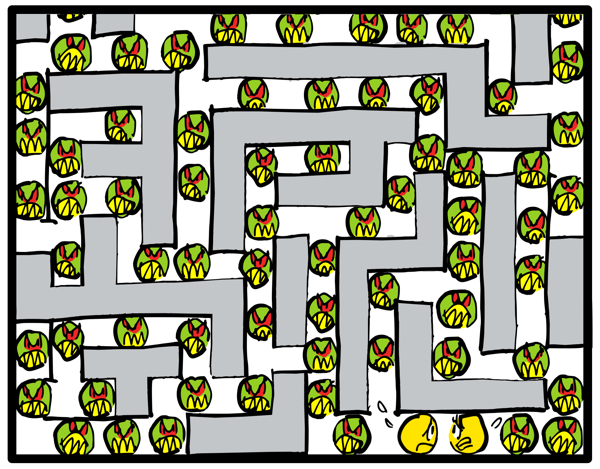
 Here’s something you may have noticed: we’re all drowning in content.
Think of the thousands of blog posts that get published every day. It’s overwhelming. And most of it goes unread. That’s a lot of wasted effort.
You’ve got to stand out. You have to make getting noticed your top priority.
So how do you do that?
With unique visuals.
Here are those old pinball favorites, Mr. and Mrs. Pac-Man, to explain it a lot better than I could.
Custom marketing visuals are valuable, so you don’t want to waste them. You want to get as much use out of them as you can.
A lot of times, that means tweaking them. Doing something to improve them, and give them a new spin.
The above video’s a perfect example. It was once a lowly quick sketch for Discover Card which wanted to publicize its loan consolidation service.
Discover picked some of my other ideas, so the above sketch was never used. I thought: I should do something with it.
Ever heard the term “upcycle”? It means taking something that’s been discarded and using it to create something of higher value.
That’s what I did. I cleaned it up, added color and a lot more bad guys, dropped it in a video app and added a soundtrack from the YouTube Audio Library.
So if you have brand-related images lying around and they haven’t seen much action, think about upcycling them.
You don’t have to create a video. Something as simple as adding captions or word balloons can get you extra mileage.
Anyone can learn some simple tricks with image-editing software– and yes, that includes you.
Here’s a link to some of the best free image editors for Mac and PC.
* * * * * * * * * * * * *
About Mark: I’m an illustrator specializing in humor, branding, social media, and content marketing. My images are different, like your brand needs to be.
You can view my portfolio, and connect with me on Twitter, Facebook, and LinkedIn.
Questions? Send me an email.


 Mark Armstrong Illustration Specializing In Content Marketing Advertising Editorial Infographics Animation Videos and Social Media
Thanks for the list of free image editors. I found GIMP a few years ago and might have abandoned it if I wasn’t already fluent in Photoshop Elements. I also use FastStone Image Viewer to easily compare pairs of photos when I am ‘weeding’ multiple similar images.
LikeLike
I know a couple of people who are big GIMP fans, but I never managed to wade into it. Not familiar with FastStone, unless you count skippin’ stones across a creek!! 😅
LikeLiked by 1 person