Illustration Pulls You Into The Story And Keeps You Reading
I enjoy doing editorial work for The Rumpus. The stories are usually first-person essays that recount difficult experiences. I do 3 or 4 illustrations for each. They’re always an interesting challenge.
A thumbnail image placed next to the title attracts attention. The illustrations break up long stretches of text. They advance the story while providing eye relief.
The latest essay: Hearse and Home: How Stephen King Saved My Girlhood.
The author recounts her harrowing life as a teen, living in an apartment above a hearse garage at a funeral home. Her stepfather, a mortician, is controlling, abusive. The girl reads to escape. She discovers Stephen King, and reads Carrie in a single day. The stepfather is enraged when he catches her reading a King novel.
The next day, the stepdad dragged me… down to the library to “have a talk with those people.” The stepdad aggressively accused the librarians of malfeasance for checking out “this trash” to “just a kid.”
They listened like good public servants, but then explained to him that a public library is a public institution that guarantees the freedom of the press and the freedom to read, inalienable rights promised in the United States Constitution.
They explained that any publicly available book in the library could be checked
out by any member of the public who held a library card.
The stepdad tried to argue this point, but they said there was nothing they could
do. Rules were rules…

 There’s no escape from the stepdad– except possibly when the phone rings…
Even the phone in our apartment was censored. It was part of a switchboard of phones with the main hub down in the funeral home. This was so, if there was a
call in the night to pick up a dead body, the stepdad could answer it.
This meant two things: one was that we girls (which included my mom) were
unable to call anyone without the stepdad being aware of it. When we did make
calls and he noticed the light on the phone indicating it was in use, he’d always
pick it up and listen. Every time. But it also meant that us girls secretly pleaded skyward that someone would die. Someone’s death was always our freedom.

For punishment, the stepdad spanks the girl with his belt. He cross-examines her every day.
(He’d come) bounding up the stairs to our apartment and burst through our front door all bug-eyed and frantic… The first words out of his mouth were, “Girls, did
you talk to any boys today?”
“No,” my sister and I would answer in unison, no matter the real truth. We knew to stick to the script.
“Are you lying to me?” he’d say, every day.
“No,” we’d say in unison.
Sometimes the interrogation continued, sometimes not. But it always ended with, “Do you love me?”
“Yes,” we’d say, in unison… (but) inside, the stubborn little girl observer-self waved
a stiff middle finger at him.

The girl returns to the library to retrieve the Stephen King book her stepdad had confiscated.
One of the two librarians from the day before, the young woman, was there. I put
it on the counter and asked, “Do you have to tell anyone if I check out this book?”
She looked at me with a cross between pity and kindness and said, “Nope. That’s private information.”
After checking out the book… I went home (and) immediately went to my room
and put my contraband in my underwear drawer—the last remaining place in my whole, shrunken world where no one else went.
And for the rest of the time I lived in that place, that’s where my Stephen King
books remained. All of them.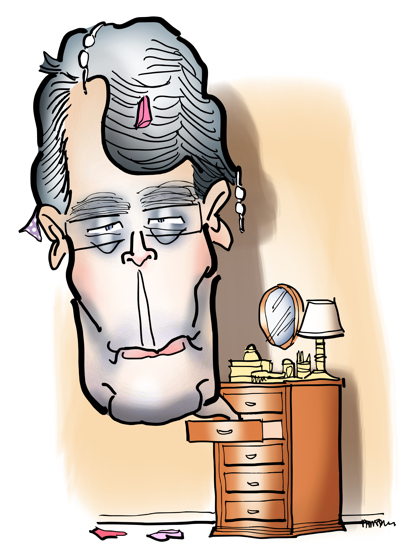
Gloria Harrison, the author of the essay, sent me this kind note after it was published:
Dear Mark,
You recently created illustrations for Hearse and Home – my essay about funeral homes, interpersonal violence, and Stephen King. The drawings you created for that piece are so spot on and yet not too morose. They’re perfect. Thank you so, so much for adding pictures to my words. You’re very talented.
All the best
Gloria
* * * * * * * * * * * * * * * * *
About Mark: I’m an illustrator specializing in humor, branding, social media, and content marketing. I create images that get content seen and shared.
You can view my portfolio, and connect with me on Twitter, Facebook, and LinkedIn.
Questions? Send me an email.


