Massachusetts Lawyers Weekly asked me to do an illustration for a story about serial filers: people who clog the court system by filing hundreds of frivolous lawsuits. Mass Lawyers requested an image of a person hauling large bins of “cases to be filed” up the steps of a courthouse.
I submitted a rough which was approved. But when I submitted the final, the client requested a change. Here’s the original final, scroll down to read more about the problem and how it was solved.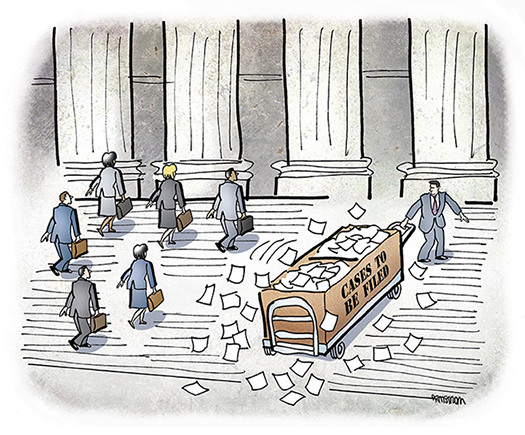
The problem: the serial filer was wearing a suit— which might cause readers to draw a wrong conclusion: that the serial filer was, himself, a lawyer.
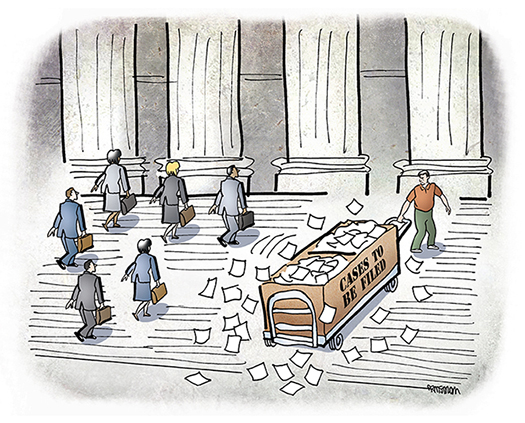
Could I change the character to someone wearing slacks, sneakers, and a polo shirt? I could.
(Note: I requested and received an additional fee for this late change, since the client had approved my rough sketch, and had never mentioned that the serial filer character should not be wearing a suit.)
I created a new serial filer character, doing the line drawing by hand, scanning in the drawing, then adding the color in Photoshop. Then I pasted the new character into
my original (layered) Photoshop document. I saw I had two problems: the new serial
filer was too big (compared to the six lawyers on the left), and he was also too static
for someone hauling a load up some steps.
I used Photoshop’s Liquify tool to alter the character’s posture. I then used the Scale
tool to shrink him a bit, proportionately, and the Dodge tool to create a bit of reflected light on his shirt and pants. Here’s a Before and After comparison:

The Liquify tool (actually categorized as a Filter for some strange reason) is one of Photoshop’s most powerful and underutilized tools. (Most how-to books show it being used to comic effect by distorting people’s faces in photographs.) I find it much easier
to use and control than the Warp tool for altering images.
I won’t go into details here re its use, because Alvaro Guzman has written this very comprehensive tutorial on the Liquify tool. I highly recommend it. I would suggest taking special note of the tool’s Freeze Mask feature which allows you to protect parts
of an image while you are warping other parts. It provides an extra measure of control, and I used it here in altering the serial filer character.
Here’s the revised final, always happy to have your comments and feedback.


If Your Guy’s Awry, Try Liquify!
Massachusetts Lawyers Weekly asked me to do an illustration for a story about serial filers: people who clog the court system by filing hundreds of frivolous lawsuits. Mass Lawyers requested an image of a person hauling large bins of “cases to be filed” up the steps of a courthouse.
I submitted a rough which was approved. But when I submitted the final, the client requested a change. Here’s the original final, scroll down to read more about the problem and how it was solved.
The problem: the serial filer was wearing a suit— which might cause readers to draw a wrong conclusion: that the serial filer was, himself, a lawyer.
Could I change the character to someone wearing slacks, sneakers, and a polo shirt? I could.
(Note: I requested and received an additional fee for this late change, since the client had approved my rough sketch, and had never mentioned that the serial filer character should not be wearing a suit.)
I created a new serial filer character, doing the line drawing by hand, scanning in the drawing, then adding the color in Photoshop. Then I pasted the new character into
my original (layered) Photoshop document. I saw I had two problems: the new serial
filer was too big (compared to the six lawyers on the left), and he was also too static
for someone hauling a load up some steps.
I used Photoshop’s Liquify tool to alter the character’s posture. I then used the Scale
tool to shrink him a bit, proportionately, and the Dodge tool to create a bit of reflected light on his shirt and pants. Here’s a Before and After comparison:
The Liquify tool (actually categorized as a Filter for some strange reason) is one of Photoshop’s most powerful and underutilized tools. (Most how-to books show it being used to comic effect by distorting people’s faces in photographs.) I find it much easier
to use and control than the Warp tool for altering images.
I won’t go into details here re its use, because Alvaro Guzman has written this very comprehensive tutorial on the Liquify tool. I highly recommend it. I would suggest taking special note of the tool’s Freeze Mask feature which allows you to protect parts
of an image while you are warping other parts. It provides an extra measure of control, and I used it here in altering the serial filer character.
Here’s the revised final, always happy to have your comments and feedback.
Follow @mrstrongarm

