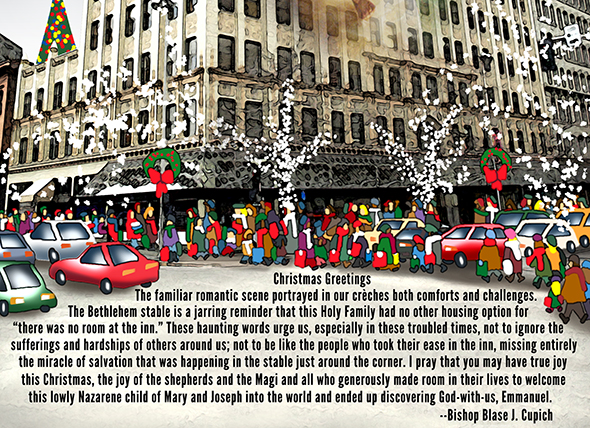
Merry Christmas From Spokane!
I did a Christmas cover for the Inland Register in Spokane, WA. I incorporated a downtown Spokane landmark, the Paulson Building, into the illustration. Here’s the original line drawing: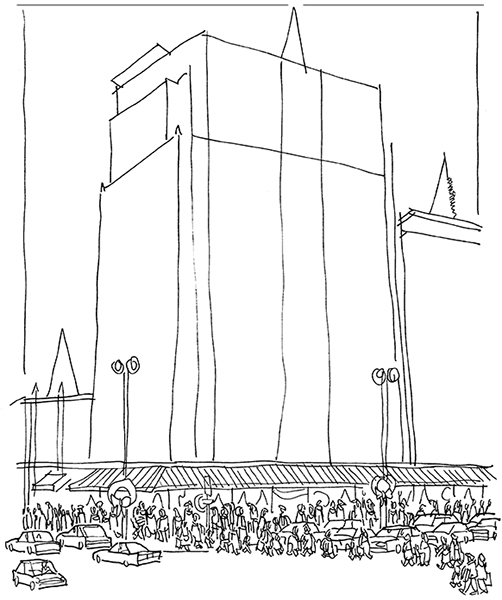
I based the sketch on this photograph of the Paulson Building:
I pasted the photo into the line drawing. Working in Photoshop, I scaled the
building to fit the drawing. I used this Janee tutorial to give the photo an illustrated look.
I cloned out the truck, motorcycle, and car in the original photo, and used a
small Photoshop brush set at 100% opacity to paint in my own cars, shoppers,
and the wreaths on the lampposts. Then I erased the corresponding parts of the
line drawing:

Next I blocked in the three Christmas trees, added lights by experimenting with
different paintbrush scatter settings, added a separate layer for the night
sky and created the sky by applying a couple of gradients.
I used the Clone tool to extend the pavement, then the Type tool to add a Christmas message from the Roman Catholic Bishop of Spokane. I added the type one line at a time so I could control its exact placement. Then I used a watercolor brush to lighten the underlying pavement, so the type would be easier to read:

I used various Photoshop brushes and Scatter settings to add falling snow, white lights on the two leafless sidewalk trees, and some red berries on the two wreathes.
To create the illustration’s special effect, I needed a Nativity Scene. I found the following photo on Stock.XCHNG. It was taken by Polish photographer Kriss Szkurlatowski. You can see more of his work at Twelve Frames Photography.
I pasted the Nativity Scene into a separate layer beneath the Paulson Building, then reduced the building’s opacity so I could see the Nativity Scene. I used the Skew and Distort transformation tools to stretch the Nativity Scene into the shape of the building. Then I reset the building layer’s opacity to 100%, applied a layer mask to the building layer, and used a soft brush set at medium opacity to paint away the building and reveal the Nativity Scene.
Finally, I added some shading underneath the pedestrians to create some depth, and used the Eraser tool to create some reflected glare on the car windows. Here’s the final illustration. Scroll down for a detail image, also a close-up which will allow
you to read the Bishop’s message.